
Embroidery Machine Software: Hatch, Embrilliance, PE-Design
Embroidery machine software compared on price, Windows or Mac, lettering, editing and digitizing, with October 2026 US prices and free options like Ink/Stitch.
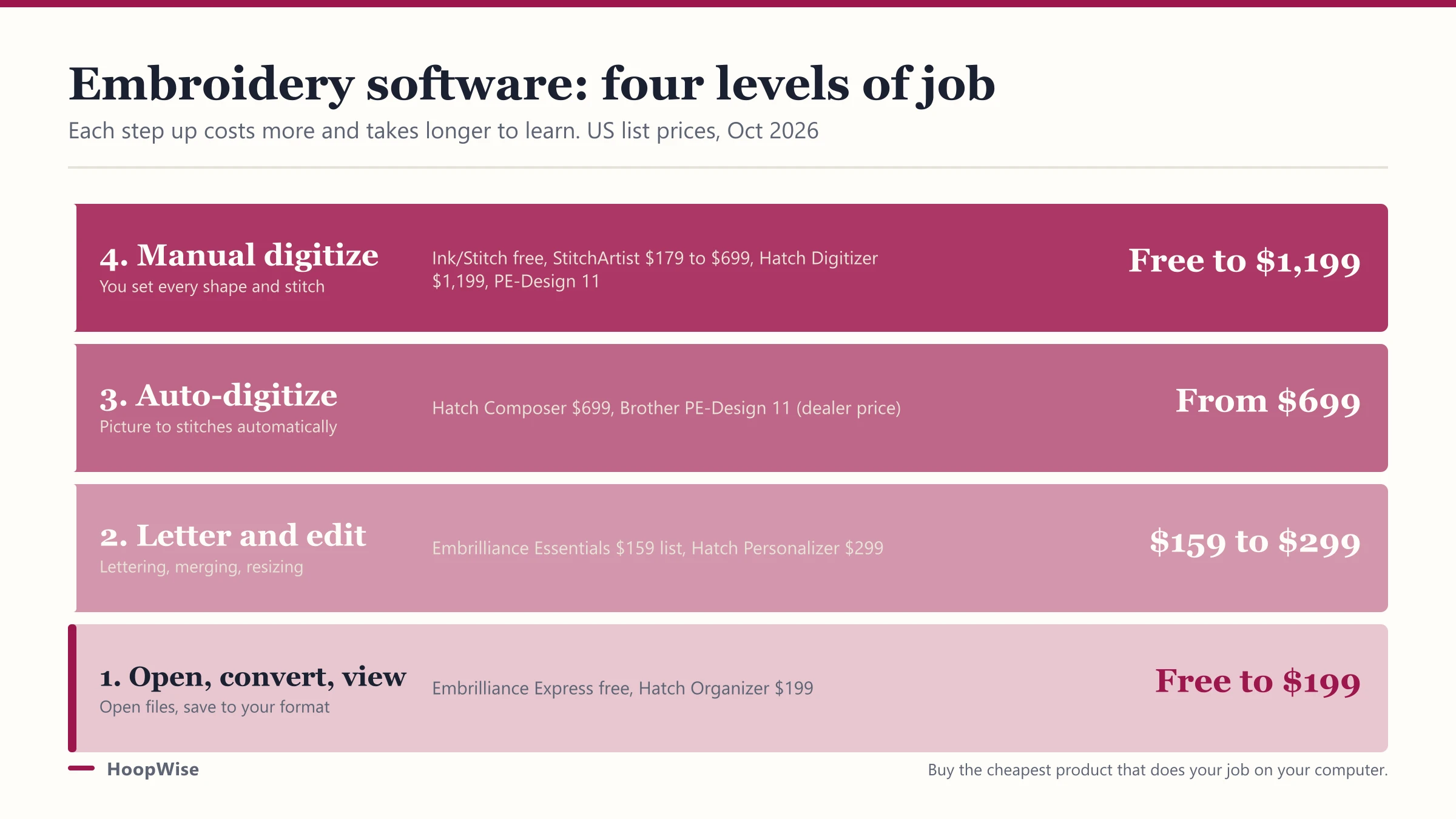
Embroidery software splits into four jobs: opening and converting files, lettering and editing, auto-digitizing, and manual digitizing. Each step up costs more and takes longer to learn. Decide which job you need first, then pick the cheapest product that does it on your computer.
What is the best embroidery machine software?
The best embroidery machine software is the cheapest product that does the job you need on the computer you own. For most home embroiderers that job is lettering and editing, and Embrilliance Essentials does it on both Windows and Mac for $159 at list price ($139 on a sale running to October 9, 2026). If you want to turn your own artwork into stitch files on Windows, Hatch Embroidery 4 is the most common choice, at $699 for Composer or $1,199 for Digitizer.
If budget is zero, start with the free tools: Embrilliance Express to letter and to save .BE files to machine formats, and Ink/Stitch to digitize. Brother owners who want everything from one maker can look at PE-Design 11, sold through Brother dealers.
What can each level of embroidery software do?
Every product on this page sits on one or more of four levels.
| Level | What it does | Examples |
|---|---|---|
| 1. Open, convert, view | Opens design files, shows stitches, saves to your machine’s format | Embrilliance Express (free, for .BE files), Hatch Organizer |
| 2. Letter and edit | Adds lettering, merges and resizes designs, recolors | Embrilliance Essentials, Hatch Personalizer |
| 3. Auto-digitize | Turns a picture or vector into stitches automatically | Hatch Composer, PE-Design 11 |
| 4. Manual digitize | You draw every shape and choose stitch type, angle and density | Hatch Digitizer, Embrilliance StitchArtist, Ink/Stitch, PE-Design 11 |
Resizing deserves one warning. Proper editing software recalculates stitches when you resize; simply scaling a file on the machine keeps the stitch count and packs or spreads the stitches. Our embroidery file formats guide explains why converting and resizing are not the same thing.
How do Hatch, Embrilliance, PE-Design and Ink/Stitch compare?
Prices are US list prices on each maker’s site in October 2026. Embrilliance prices were discounted during a sale ending October 9, 2026; the regular price is shown first. Read the table by column: find the last job you need (lettering, auto-digitizing or manual digitizing), then pick the cheapest row that runs on your computer.
| Product | Price (Oct 2026) | Windows | Mac | Lettering | Editing | Auto-digitizing | Manual digitizing |
|---|---|---|---|---|---|---|---|
| Embrilliance Express | Free | Yes | Yes | BX fonts | Open .BE files, save to machine formats | No | No |
| Embrilliance Essentials | $159 ($139 sale) | Yes | Yes | 21 fonts | Yes, with stitch recalculation | No | No |
| Embrilliance Enthusiast | $179 ($169 sale) | Yes | Yes | Via Essentials | Advanced stitch editing | No | No |
| Embrilliance StitchArtist 1 / 2 / 3 | $179 / $389 / $699 | Yes | Yes | Font publishing at Level 3 | Yes | No (the maker says it is not an auto-digitizer) | Yes |
| Hatch Organizer | $199 | Windows 11 | No | No | Resize, recolor, convert | No | No |
| Hatch Personalizer | $299 | Windows 11 | No | 66 fonts | Yes | No | No |
| Hatch Composer | $699 | Windows 11 | No | 78 fonts | Yes | Yes | No |
| Hatch Digitizer | $1,199 | Windows 11 | No | 130 fonts | Yes | Yes | Yes |
| Brother PE-Design 11 | Dealer price | Yes | No | 130 fonts | Yes | Yes (Auto Punch, Photostitch) | Yes |
| Ink/Stitch 3.3 | Free (GPL-3.0) | Yes | Yes (also Linux) | Yes | Yes | Fills vector shapes automatically; no photo-to-stitch | Yes |
Which Hatch Embroidery level do you need?
Buy the lowest Hatch level that covers the job you will do every month. Hatch Embroidery 4, from Wilcom, comes in four levels: Organizer ($199) organizes, resizes, recolors and converts; Personalizer ($299) adds 66 fonts and monogram templates; Composer ($699) adds auto-digitizing, multi-hooping and vector support with 78 fonts; Digitizer ($1,199) adds manual digitizing with full stitch control, advanced appliqué, color PhotoStitch and 130 fonts.
Hatch runs on Windows 11 only. The 30-day trial opens all four levels with no credit card, which is the honest way to find out if you will use Composer’s auto-digitizing or need Digitizer’s manual tools. Hatch also sells Composer and Digitizer on monthly FlexPay installments. Hatch is a common choice for small businesses running multi-needle machines, since it writes the commercial DST format as well as home formats.
Why buy Embrilliance in pieces?
Embrilliance is modular: you buy only the modules you need, and they open in one window. Express is free, opens .BE files, saves them to machine formats and types with BX fonts. Essentials ($159 list) adds merging, resizing with stitch recalculation, overlap removal, colorizing, template printing, lettering with 21 fonts and splitting a design across hoops. StitchArtist adds manual digitizing at three levels, $179, $389 and $699, and Embrilliance states plainly that StitchArtist is not a photo-to-stitch or auto-digitizing program.
The appeal is the platform: Embrilliance runs natively on macOS and on Windows, so a Mac owner gets real editing and digitizing without virtualization. Essentials also includes thread brand conversion and colorizing for planning colors; for checking how close a cross-brand match really is, our thread converter scores each match with a color-difference number.
Who is Brother PE-Design 11 for?
PE-Design 11 is Brother’s own Windows digitizing software, aimed at Brother and Baby Lock owners who want one program for lettering, editing and digitizing. Brother lists 1,000-plus built-in designs and 130 built-in fonts, Photostitch, enhanced Auto Punch and Cross Stitch wizards, import of ScanNCut FCM cut files, and Intelligent Color Sort to reduce thread changes. It can also send designs over wireless LAN to Brother’s Luminaire XP1, XP2 and XP3.
Brother’s product page shows no price; PE-Design 11 is sold through Brother dealers, so get quotes, and download Brother’s free trial version first. It saves Brother’s PES format natively, which suits Brother and Baby Lock machines. If you own another brand, Hatch or Embrilliance write more formats with less friction.
Is free embroidery software like Ink/Stitch good enough?
For many hobbyists, yes. Ink/Stitch is a free, open-source machine embroidery digitizing extension for Inkscape, licensed GPL-3.0, that runs on Windows, macOS and Linux. Version 3.3.0 was released on July 31, 2026. You draw or import vector shapes in Inkscape, assign stitch types, and export.
It writes DST, EXP, JEF, PEC, PES, VP3, XXX, U01 and TBF, among others, and reads more than 30 embroidery formats. The trade-off is time: Ink/Stitch is closer to manual digitizing than to one-click conversion, and you need to learn Inkscape as well. If you want to type a name on a towel tonight, Embrilliance Express is faster. If you want to learn digitizing without spending money, Ink/Stitch is the strongest free option.
What is the best embroidery software for Mac?
Embrilliance is the best embroidery software for Mac for most people, because it runs natively and scales from free (Express) to lettering (Essentials) to manual digitizing (StitchArtist). Embrilliance lists support for macOS 10.9 through the current version. Ink/Stitch is the free Mac alternative for digitizing.
Hatch and PE-Design are Windows programs. Hatch says Mac owners can run it under virtualization software such as Parallels Desktop on a Windows 11 installation; that adds the cost of the virtualization software and a Windows license, so price it in before choosing Hatch on a Mac.
Is auto-digitizing worth paying for?
Auto-digitizing is worth it for simple, bold artwork and as a starting point you then clean up; it is rarely good enough for a customer logo straight out of the box. Auto tools guess stitch angles, underlay and density from the picture, and small text, thin lines and gradients often come out heavy or ragged.
A practical rule: if the artwork has clean shapes and few colors, Composer-level auto-digitizing saves hours. If it has small lettering or fine detail, you will either learn manual digitizing (Hatch Digitizer, StitchArtist, Ink/Stitch, PE-Design) or pay a digitizing service per design. Use the free trials on your own artwork before paying.
Do you need embroidery software at all?
Not at first. Current embroidery machines can stitch purchased designs in its own format from a USB stick, and most include built-in fonts and on-screen editing such as rotating, mirroring and small resizing. Plenty of owners run for a year on that alone. Our machine embroidery for beginners guide walks through a first project with no software.
Software earns its price when you want custom lettering in fonts your machine lacks, to merge several designs into one hooping, to resize with stitch recalculation, or to create designs from your own artwork. Budget it alongside thread and stabilizer when you plan the machine purchase in our embroidery machine buying guide.
Who should not buy embroidery software yet?
- New owners who have not stitched 20 designs. Learn hooping and stabilizer first; software will not fix puckering caused by the wrong backing.
- Anyone who only needs a file in another format. Ink/Stitch is free and converts files, and the free Embrilliance Express saves .BE files to machine formats.
- Mac owners considering Hatch. Try Embrilliance first; virtualization adds cost and another layer to troubleshoot.
- Anyone buying a digitizing level for a single logo. A one-off logo is usually cheaper to have digitized than to learn manual digitizing for.
Sources and price checks (October 2026): Hatch Embroidery pricing page (levels, prices, Windows 11 requirement, trial); Embrilliance store, Essentials, StitchArtist and Express pages (prices, sale end date, platform support); Brother USA PE-Design 11 product page (features, trial); inkstitch.org (version and release date), the Ink/Stitch file formats documentation and the Ink/Stitch GitHub repository (license, platforms).
Frequently asked questions
Quick answers to what readers ask us most
What is the best free embroidery software?
Embrilliance Express is the easiest free option: it runs on Windows and Mac, saves .BE files to machine formats and types names with BX fonts. Ink/Stitch is free, open source and does real digitizing inside Inkscape, but takes longer to learn.
What embroidery software works on a Mac?
Embrilliance runs natively on macOS and Windows, and Ink/Stitch runs on macOS, Windows and Linux. Hatch Embroidery 4 is Windows only; Hatch says Mac users can run it through virtualization such as Parallels Desktop.
Is Hatch embroidery software worth the price?
It is worth it if you will digitize your own designs on Windows. If you only need lettering, resizing and format conversion, Hatch Personalizer ($299) or Embrilliance Essentials ($159 list) costs far less. Hatch offers a 30-day free trial with no credit card.
What is the difference between auto-digitizing and manual digitizing?
Auto-digitizing converts artwork into stitches with one command and usually needs cleanup. Manual digitizing means you draw each shape and set its stitch type, angle and density yourself. Manual gives cleaner results and takes skill.
Do I need software to use an embroidery machine?
No. You can load purchased designs in your machine's format from a USB stick and use the built-in lettering. Software becomes useful once you want to combine designs, add custom lettering or create your own designs.